
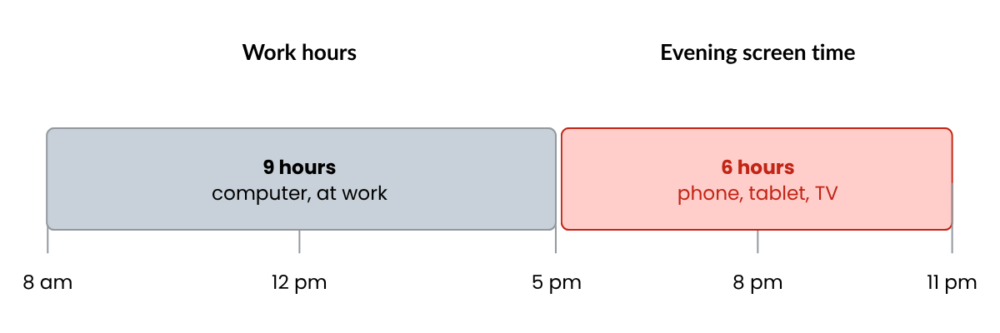
A few weeks ago, I checked my screen time on my phone, mostly out of curiosity. The number made me raise an eyebrow. Between the shows I watch on my iPad before bed and scrolling on my phone during coffee breaks, it hit me that screens don’t really clock out at 5pm. And I’m guessing I’m not the only one.
We tend to talk about the 6 to 8 hours we spend in front of a computer at work as if that’s the whole story, but evenings add another layer on top. The real total is usually a lot higher than we think. My point here isn’t to make anyone feel guilty (myself included), it’s just that it shifts the way we look at things: taking care of our eyes and our sleep goes well beyond how our desk is set up.
So what exactly is blue light?
In its natural form, blue light comes from the sun. It’s what tells our brain it’s daytime, which suppresses melatonin (the sleep hormone) to keep us awake and alert.
The problem is that our screens beam a much more concentrated version of it straight at our eyes. That light forces our vision to work overtime to stay focused, which explains the stinging, dryness, and headaches after a full day at the computer.
Worth noting, science hasn’t definitively proven that blue light causes long-term eye damage. What’s better documented, though, is its effect on sleep. Looking at a screen in the evening can delay melatonin production and make it harder to fall asleep. And we all know a bad night’s sleep costs us the next day in focus at work.
What actually works
The good news is you don’t need to cut screens out of your life completely. A few small adjustments go a long way in protecting both your nights and your eye comfort during the day.
The 20-20-20 rule
We covered this in an earlier article, but it’s worth repeating since it’s such an easy habit to build. Every 20 minutes, take 20 seconds to look at something about 20 feet away. It’s easy to forget, but it makes a real dent in end-of-day eye fatigue. Set an alarm if you have to!
Positioning your screen the right way
To keep your eyes from straining, the best setup is a desk positioned with the window to the side. Sit with your back to the window and glare bounces off your screen, forcing your eyes to work nonstop. Face the window and you’re stuck in backlight, sun in your face, with a screen that’s dark and hard to read (even if it does make for nice lighting on video calls 😉). A quarter turn of your desk or a quick blind adjustment can make all the difference.
Balanced lighting
A bright screen in a dark room (or the opposite) forces your eyes to keep readjusting. The goal is finding a middle ground where your screen brightness matches the room around it.
The built-in filters you already have
Whether on your computer or your phone, these settings automatically shift your screen toward warmer tones as evening rolls in, cutting blue light without disrupting your experience. It takes two minutes to set up:
- On Windows (Night Light): Go to Settings > System > Display, then turn on Night Light. You can even schedule it to switch on automatically at sunset.
- On Mac (Night Shift): Go to the Apple menu > System Settings > Displays, then click Night Shift in the bottom right to set a schedule.
- On iPhone and Android: Find Night Shift (iOS) or Night Light/Eye Comfort (Android) right in the quick-access menu by swiping down from the top of the screen.
What about blue light glasses?
These get pitched to us a lot, whether as glasses or contact lenses at the optometrist, but the truth is most recent studies show they do very little for eye fatigue. That fatigue mostly comes from not blinking enough and staring at a fixed distance for hours, which is exactly why the 20-20-20 rule matters so much. These glasses might help a bit with sleep if you’re working late, but the filters already built into your devices work just as well, without spending a dime.
Looking out for the person behind the screen
Getting your team on board with these small adjustments is a simple equation: less eye fatigue means more focus and better productivity day to day. It’s also the kind of thing that fits naturally into a health and safety bulletin or an internal wellness note.
As an IT partner, we believe looking out for the people behind the screens matters just as much as managing the equipment itself. Giving employees the right habits for their digital wellbeing is a win for everyone. And if you’re looking for an IT partner who’s genuinely in your corner, you know where to find us. 😉