
If you’ve ever saved a file and then spent five minutes trying to find it, you’re not alone. OneDrive and SharePoint are both part of Microsoft 365, they both store files, and they both sync to your desktop. So what’s the actual difference?
The short answer: one is yours, the other is for your team’s. Let’s break it down. un est pour vous, l’autre est pour votre équipe. On vous explique.
OneDrive in a nutshell
Think of OneDrive as your personal filing cabinet, the way ‘My Documents’ used to work before everything moved to the cloud. Everything you save there is yours. Your drafts, your working documents, and your files that aren’t ready to be shared yet.
You can share files from OneDrive, but by default, only you can see them. It syncs across all your devices, so your files are always accessible wherever you work. Keep in mind that at work, your OneDrive is tied to your company email. If you leave, you lose access along with your account.
Rule of thumb: if it’s yours, it goes in OneDrive.
À quoi sert vraiment SharePoint
What SharePoint is actually for SharePoint is your team’s shared workspace. Think of it as the company filing cabinet that everyone on the team can access, contribute to, and organize together.
When a document lives in SharePoint, it belongs to the team, not to one person. If someone leaves the company, the files stay. If someone needs access, you give it to them without having to forward anything.
It’s also what powers the file storage behind Microsoft Teams. Every time you share a document in a Teams channel, it’s actually being saved in SharePoint whether you realize it or not.
Rule of thumb: if it’s for the team, it goes in SharePoint.
The simple rule
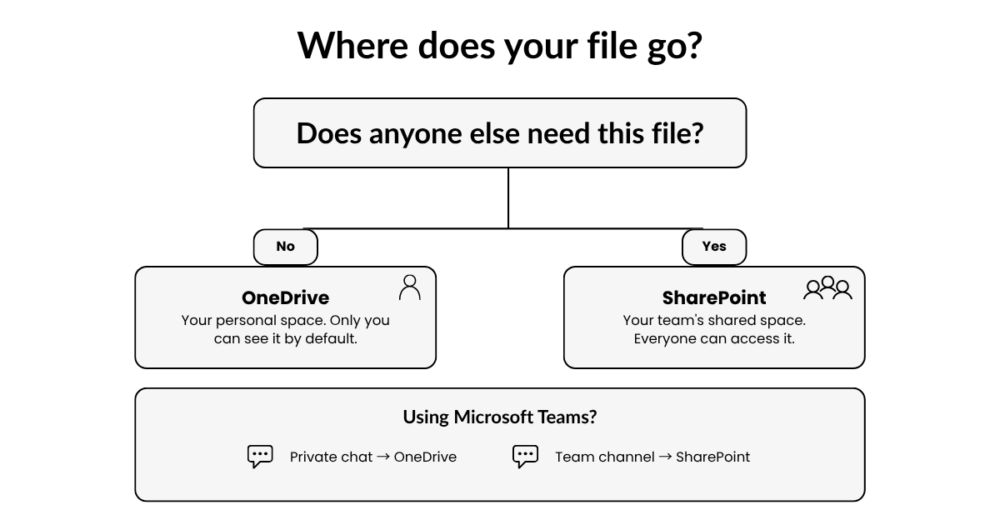
A good way to think about it: if you’re the only one who needs the file, save it in OneDrive. If two or more people need to work on it, access it, or find it later, it belongs in SharePoint.
Still not sure? Ask yourself: would anyone else need this file if I wasn’t here? If the answer is yes, SharePoint is the right place.
What about Teams?
If you use Microsoft Teams, here’s something worth knowing: where your file ends up depends on where you share it.
For example, if I send a document in a private chat with my designer, it goes to my OneDrive. It’s a one-on-one conversation, so the file stays in my personal space.
But if I share that same document in our Marketing channel, it automatically saves to SharePoint, where the whole team can find it.
So if you’ve ever wondered where your Teams files actually live, now you know.
Ready to get organized?
OneDrive, SharePoint, Teams… it’s a lot to keep track of, especially when you’re just trying to get work done. As a Microsoft partner, helping our clients get the most out of their tools is part of what we do every day.
If you’re looking for an IT partner that does more than just fix problems, we’d love to chat. Reach out to Marc to book a quick call.